my life photos/cooking travel reviews reading about me
support a good cause


WeGiveBooks.org

Help A Mother Out


oh, all the places where I write
also seen here
proud member

Kidworth Teaches Families How to Manage Money Wisely

The idea for Kidworth came to founder, Rudy DeFelice, at a five-year-old’s birthday party. As he observed the birthday kid opening gift after gift in a frenzy probably not unlike this past Christmas morning at millions of homes, he recalls:

One dad pointed out that the pile represented $600 of plastic that would soon end up in a landfill, and the kid would not remember the gifts or who they were from. Not very satisfying for the kid or the gift giver – or very good for society.

Of course, a mountain of new toys is always fun in theory, but what happens when they break an hour later. Is it really worth it?

As the excitement of the holidays finally winds down and the credit cards bills slowly arrive, it’s a great time to put the holiday madness into perspective. There is a better way of doing thing in 2012. Perhaps it’s even one of your New Year’s Resolutions to focus your finances and energy in a new directions— build you savings, spend more time as a family, or take more vacations.

Have you given any thought as to how you will get there?

Kidworth is an online service that offers an excellent way to teach kids (and parents) about budgeting for the things that really matter.

Parents can register for free and set up an account with their children. (Or in my case, for my children since mine are still too young to grasp the idea of money.) Then, they can share those goals with the people in the kids’ lives.

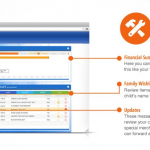
Here is an example of the portfolio I created for my son, Scout:

Kidworth

Scout is five year old and does not want for much, but I know he will probably want to go to college one day… I hope. So I made a category for “College Savings” in the “Save” goals. This is a huge goal for us. Priority #1 for both of our children’s savings.

My son also enjoys karate, Legos, and burns through art supplies like it’s rocket fuel. So, those are the big items in his “Spend” goals.

The biggest charity I support is his Catholic school. Throughout the year, the school will ask the kids to raise money for the Walk-a-thon or a pig. These are items for the “Share” goals, wherein we set aside funds throughout the year to donate.

Now, when a special occasion like birthdays, holidays, or graduations come around, and someone asks what they should get the kids, I can simply direct them to our Kidworth page through our unique URL. Our personal information stays private. There isn’t even show any info on my children beyond their names and birth date. However, other people will be able to see the things they are “working” towards and contribute to them directly through the site.

There’s also an option to send an e-card to interested parties who would want to give money towards these financial goals. However, I would never do that unsolicited. Only when asked what the kids want, which always happens around birthdays and holidays.

“What do the kids want?” they ask.

“Oh anything,” I sheepishly reply since I find it a tad awkward to demand specific items and price points for other people.  After all. I can’t imagine that it’s that hard to shop for a 5- and 2-year-old! But, bless them, they just want to get the kids exactly what they will really, really love and cherish.

Caught off guard, my mind usually goes blank. Having gone through the process of discussing and setting aside specific goals for my kids, I know exactly what they need!

In Scout’s case, that would be karate classes. For Lou, it is swim lessons. So, this exactly what Mike’s parents got them this year and they really, really love and cherish it!

Disclosure: As a Kidworth Ambassador, I was compensated for sharing how our family saves, spends, and sets goals. If one of your New Year’s Resolutions was to take control of your family’s finance, look into registering for an account with Kidworth? Because it’s never to early or too late to make smarter choices around your budgeting and goals!

No comments yet

12 Things in 2012

Last December, I reflected on the 11 things my life doesn’t need in 2011 as part of #reverb10. Here they are again in no particular order: Wishing for my old life back, Perfection, Energy Sucks, “Yes”, Fear, Worry, Stuff, Other People’s Issues, Wishing instead of Doing, Bulk, and Hurry.

How did I do?

Fear and Worry are a given when you’re a parent… and a human being. It’s what drives and motivates us. They are inescapable, but I did make an effort in 2011 to not let them rule my life entirely. Mostly, it had to do with not reacting, but instead, thinking through what is and is not a valuable outcome.

Perfection, Energy Sucks, and Other People’s Issues were easy to ditch in 2011. I just didn’t have the time! I was too busy doing (instead of wishing) and attempting to move my own life forward.

I still have an issue with saying “Yes” to too many things, but the difference was that the “yes” was more often something for us—volunteering at the kids’ schools,  putting in more effort at my moms’ group, finding interesting projects, etc. I’ve discovered that “yes” to things that enrich our lives is a thousand times more satisfying than a “yes” to win someone’s love and approval.

I will always wish for my old life back, but not in the same sense. There are a lot of things that I miss from when I used to be some place I thought I would be forever and ever– a sense of community, a sense of belonging. In many ways, we have found those things here. In other ways, we have not.

I found myself less attached to Stuff, as evidenced by my massive end-of-year clean out of the garage and closets. All of the girl clothes went to my best friend’s infant daughter. All of the boy clothes went to my cousin’s two sons. The rest were dropped off at Goodwill. I also made an effort to purchase less in 2011, and instead spend more on experiences with the kids—activities, day trips, museum passes.

Excessive Bulk and Hurry are things I am (unfortunately) carrying with me into 2012. I just have to keep working at it.

It was more difficult to come up with a list of “12 things my life doesn’t need in 2012″, since the very first things I could think of are squarely NOT within my control. For instance, “surprises” (not the fun kind)…  2011 was going well enough until the very, very end. Then *smack*… SURPRISE!

On that note, I would also love do away with uncertainty, instability, and frustration.  Don’t we all.

So rather than coming up with 12 things I don’t need in 2012, I decided to focus on 12 things I want to accomplish in 2012. Here they are in no particular order:

1. Complete my blog redesign. Yes, the same blog redesign that I teased you with months ago. The project was put on hold because I got busy and overwhelmed. I hoped to have it ready before 2012… Now, I hope to have it done by the end of the month.

2. Take a photography class. Per my Tech Resolutions in 2012… It’s either this or improve my Photoshop skills.

3. Set limits on my work. 2011 was the year of the 24/7 work week. Yet, I ended the year feeling as if I had accomplished NOTHING and let everyone down. How does that work? Well, I was constantly chasing after projects and to-do lists, then staying up until the breaking point to complete them. I was so crazy exhausted that I never did anything very well.

One of my goals in 2012 is to set aside dedicated work hours and dedicated non-work hours. There will be days when my computer stays shut and my phone will be used as…a phone. I owe it to my family. I owe it to myself.

4. Focus on a single meaningful project.  Drop the things that have been holding me back. Do the things that move me forward.

5. Exercise regularly. If only for the alone time…

6. Reading for pleasure. Writing for fun. 

7. Create family rituals. Friday movie night. Saturday bike ride. Sunday dinner. Whatever it is, I want there to be one thing that our family does together once a week.

8. Take the time to be a good wife. Seven years doesn’t seem like very long time to be married, especially since our parents’ marriages are going strong at 30+ and 40+ years. Yet, the past few years of my marriage have been tough for a variety of reasons. Yet, there have been glimmers and moments when I remember why I fell in love with Mike in the first place.  Actually, there are glimmers and moment every single day. I’ve just been too busy to notice… In 2012, I want more glimmers and moments.

9. Reclaim my faith. As much as the past few years have been a strain on my marriage, it has been doubly so for my faith.

10. Post my work goals in plain sight. It feels like cheating to list “making goals” as a goal, but taking the time to think through and really imagine what I want to accomplish professionally. What are these sleepless nights, deadlines, and endless hours all about? This is huge.

11. Start a Gratitude Project. I started one at the beginning of 2011, but let it fall by the way side.

12. Remember to smile and savor the moment.

What are the 12 things your life needs more of in 2012? How will you go about getting them? How will getting these things change your life?

1 comment

New Year’s Resolution– Great Weigh Loss Apps for 2012

My article on 12 Great Weight Loss and Fitness Apps for 2012 is featured on Type-A Parent today, just in time for your New Year’s resolutions.

After weeks of indulging, toasting, and feasting, come January first, our gusto turns towards shedding those holiday pounds. Eat better. Get in shape. Lose weight. This is probably the same resolution you made in 2010… and in 2009… and in 2008. You start off with motivation up and spirits high, but by the end of January or beginning of February, most people tend to go back to their same, old bad habits.

Don’t let another year slip by you! Here are seven tips and some helpful apps to keep your weight loss goals on track in 2012…

Read the rest at Type-A Parent

{Image credit: zirconicusso}

No comments yet

My 5 Tech Resolutions for 2012

It’s that time of year again. Away with the old and in with the new! As 2012 approaches, I’ve decided to make some serious changes to my life. My digital life, that is…

1. Computer Back-up Squared Away.

We have three levels of back-up in our house– in the Cloud, on an external hard drive hooked into our network, and wishing. At one point in 2011, all three methods failed me… and then my laptop died. Whop-whop. 

My first order in 2012 will be to make sure the online and hard drive backups are running and in good shape.

2. Learn How to Use My DSLR… at long last.

Are you tired of hearing me talk about the DSLR that I STILL operate on “auto” three years later? It’s disgraceful if you ask me…

I have high hopes for taking a class– a real, hands-on, photography class- sometime in 2012. In the meantime, I downloaded the Master Your DSLR Camera app from Open Air Publishing for the iPad. It’s a great start.

3. Manage My Money Like a Grown-up

In 2009, the money management software that I had been using was discontinued. In 2011, my bank stopped supporting it. Six months later, I finally noticed. Clearly, budgeting and household finance are not my strong suit, but I’m still more diligent about it than Mike…

In search of a no-brainer, quick way to track our household finances, I discovered Mint.com. Available as an app for the iPadGoogle Chrome, and Android, there is no excuse to fall behind on budgeting… or so I hope!

4. Upgrade Mike to a Smartphone

Mike still swears by his flip phone, which I find to be the tech equivalent of  a turtle on its back. Bleck! 

5. Recycle My Old Devices and Batteries

I’ve been accused of being a tech hoarder. Yes, I am guilty of converting our linen closet into a “charging station” for all of my cords and devices. Yes, I upgraded my phone three times in 2011… Writing about tech is my job! That’s my excuses and I’m sticking with it.

Honestly, I could do with some purging and donating of devices in 2012.

What are YOUR tech resolutions in 2012?

{image credit: DryIcons}

1 comment

Safety First with the New Bipper bSafe App

bsafe

When I was 19 years old, I spent the Spring semester of my sophomore year at my college’s campus in Rome. For six glorious months, I not only reveled in the Eternal City, but was also strongly encouraged… nay, kicked off of the campus… to explore the far reaches of my EuroRail pass every weekend, break, and holiday. As I said… glorious.

I did all the things a respectable (if not, super nerdy) American liberal arts major would be expected to do while living in Europe on her parents’ dime.  I climbed church steeples. I entrenched myself in museums, ruins, and catacombs. I made wishes at fountains. I debated styles of architecture… as if I had any clue. I woke up one morning with a craving for waffles, so my friend Chris and I went to Belgium. Naturally.

Then there were all of the other  things I did.

For instance… I have no idea how we even got there. There is a photo of my best friend and I covered in mud and standing in the rain at some Communist rally/rock concert somewhere outside of Rome. Barely legal to vote and certainly not “allowed” to drink in our home country, we took full advantage of being young, dumb, and in Europe. The Communist rally was no exception.

A bit tipsy and completely drenched, we made the super responsible decision to HITCHHIKE back to school in the car of two Italian men named Angelo and… umm, something else. We had them drop us off at the next town over from our campus…(because it was IN the car with that two strange men who we did not know whatsoever that we decided to be cautious. Right!) Then, we walked on the side of  a dark country road in the middle of the night to get back to our dorm. It was after hours, so once we arrived, we then had to climb over the metal gate with the spikes and jump off the other side.

It is a miracle of youth and stupidity that my best friend and I are alive and have our own daughters now. When people ask if I would every let my children go to my alma mater and have the same privilege of living in Rome as I did, I think… “Umm, hell no”.

Of course, when I was in college dinosaurs ruled the Earth cell phones were no quite standard issue and spotty dial-up was accessed only at Internet cafes. What’s broadband? What’s a smartphone? My only contact with my family and then boyfriend were through payphones and calling cards. I sent a post card home from every city I visited, but those arrived long after I departed– off to another Irish pub, Greek nightclub, or German film set. ( That’s another story.) Not much solace, if you ask me.

I am only kidding about letting my kids go off to explore the world one day. My children are quite young at the moment, but I know that I can’t stop them  from growing up or screwing up any more than my parents could stop me. At least technology has made it possible to have much more piece-of-mind than my parents probably did while waiting for a random phone call from their belligerent offspring.

Bipper, the company who developed Bipper Kids as a way for parents to track their kids’ mobile usage, has recently introduced the bSafe app. It is an emergency alert button for your smartphone. Although this technology was initially offered as a feature in their mobile tracking service, it has since gained so much popularity among adults that Bipper has spun it off as a stand-alone product.

bSafe is a free app that turns your smartphone into the “ultimate safety device”. With the push of one button, the bSafe app will alert selected contacts that you are in danger and share your location using your phone’s built-in GPS. It’s the ideal companion to anyone who has to walk alone at night, an elderly relative who maybe in danger of falling, or even college kids who should know better than to hitchhike and should have probably just called an RA to come get them from the Communist rally/rock concert… ahem.

Here is a quick step-by-step on how this clever little app works:

You hope that you never have to use an app like this, but it is such a comfort to know that you have it when you do… just in case.

Learn more about Bipper and the bSafe app by going to NeverWalkAlone.com. The app is free to download on Apple, Android, and Blackberry devices through the app stores. Another way is to simply text bSafe to 84145 or enter your phone number on the bSafe site. The link to download the app will be sent directly to you via SMS.

Disclosure: I was compensated to review the bSafe app. The views, options, and irrational fears shared in this post are all my own. 

3 comments


Howdy!
Hello, I'm Grace Duffy. Married to Mike. Mom to "Scout" the boy and "Lou" the girl.

Tech Columnist. Mommy Blogger. Real Housewife of Silicon Valley. I'm everywhere you tweet my name.

Read more about me.
let’s be social
flickr stumbleupon posterous Send me an 
email


Fill the Backpack 2011 Sponsors
conferences


I'm Speaking at BlogHer '11!
brand amabassadorships


I'm a Chica Logic Brand Ambassador

I'm a Mabel's Labels Buzzmama